Overview of Financial Modeling
What is a financial model?
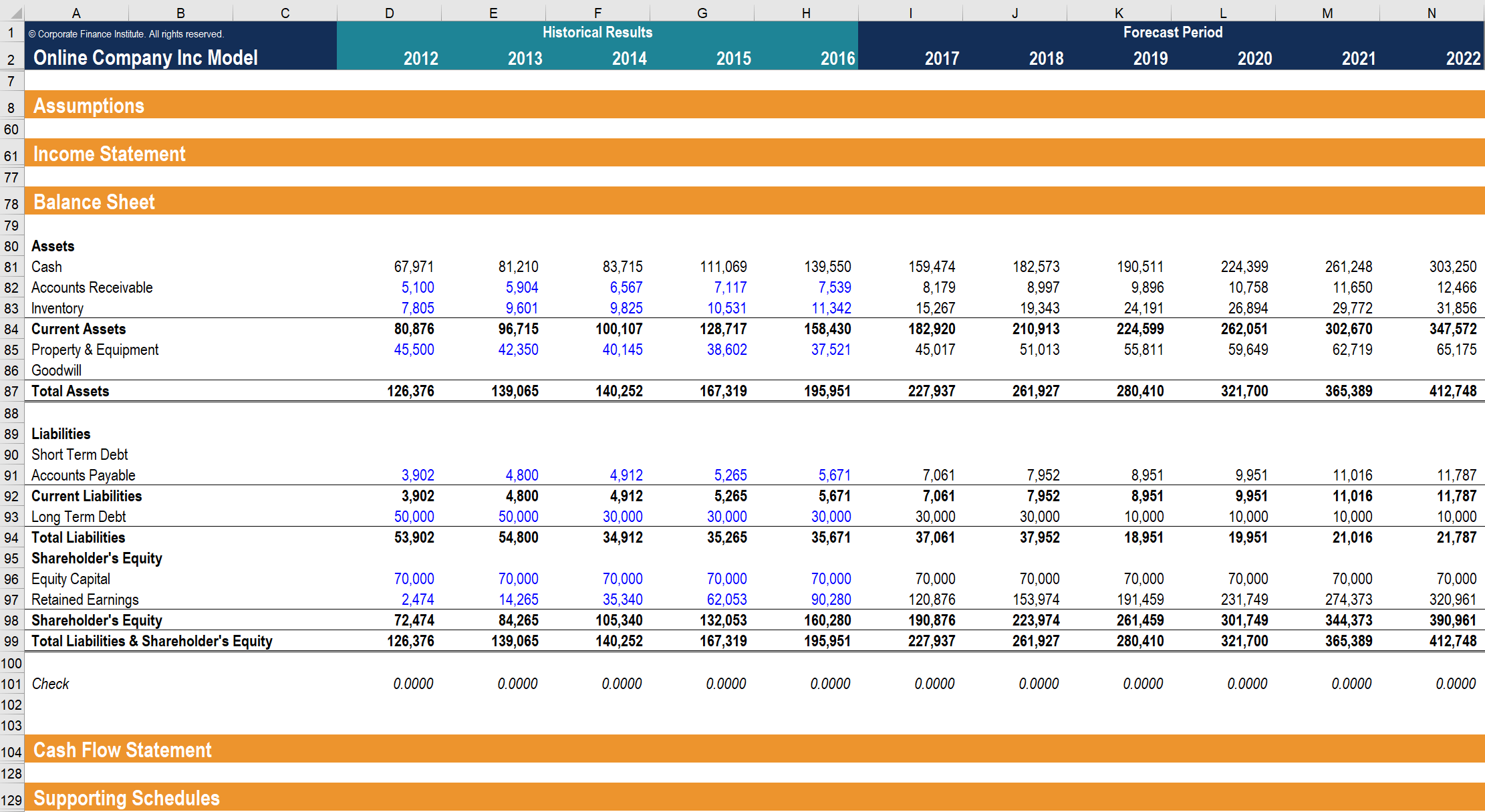
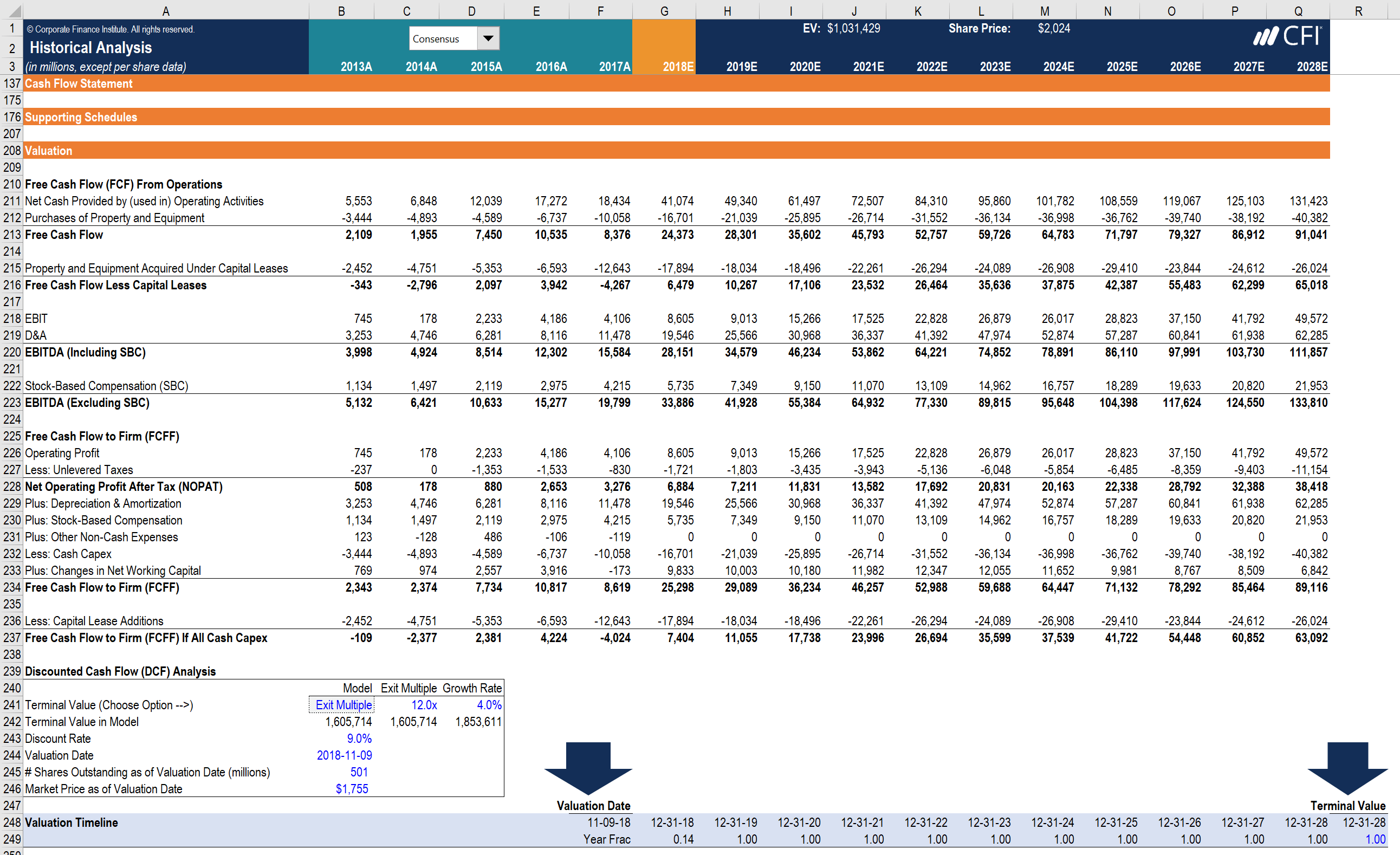
A financial model is simply a tool that’s built in spreadsheet software such as MS Excel to forecast a business’ financial performance into the future. The forecast is typically based on the company’s historical performance, assumptions about the future, and requires preparing an income statement, balance sheet, cash flow statement, and supporting schedules (known as a 3 statement model). From there, more advanced types of models can be built such as discounted cash flow analysis (DCF model), leveraged-buyout (LBO), mergers and acquisitions (M&A), and sensitivity analysis. Below is an example of financial modeling in Excel.
What is a financial model used for?
The output of a financial model is used for decision making and performing financial analysis, whether inside or outside of the company. Inside a company, executives will use financial models to make decisions about:
- Raising capital (debt and/or equity)
- Making acquisitions (businesses and/or assets)
- Growing the business organically (e.g., opening new stores, entering new markets, etc.)
- Selling or divesting assets and business units
- Budgeting and forecasting (planning for the years ahead)
- Capital allocation (priority of which projects to invest in)
- Valuing a business
- Financial statement analysis/ratio analysis
- Management accounting
Who builds financial models? (jobs and career)
There are many different types of professionals who build financial models. The most common types of career tracks are investment banking, equity research, corporate development, FP&A, and accounting (due diligence, transaction advisory, valuations, etc).
To learn more about jobs and careers that require building financial models, explore our interactive career map.

How can you learn financial modeling?
The best way to learn financial modeling is to practice. It takes years of experience to become an expert at building a financial model and you really have to learn by doing. Reading equity research reports can be a helpful way to practice, as it gives you something to compare your results to. One of the best ways to practice is to take a mature company’s historical financials, build a flat-line model into the future, and calculate the net present value per share. This should compare closely to the current share price or the target prices of equity research reports.
It’s also important to establish a solid base understanding by taking professional financial modeling training courses such as ours offered at CFI, with many locations across North America or directly online. In the meantime, you may also be interested in having a go at building your own financial models. Feel free to use our available free templates to get a jump start before taking one of our courses.
What are financial modeling best practices?
1. Excel tips and tricks
It’s very important to follow best practices in Excel when building a model. For more details you can take our free Excel course, which outlines the following key themes:
- Limit or eliminate the use of your mouse (keyboard shortcuts are much faster)
- Use a blue font for hard-codes and inputs (formulas can stay black)
- Keep formulas simple and break down complex calculations into steps
- Ensure you know how to use the most important Excel formulas and functions
- Use INDEX and MATCH instead of VLOOKUP to query data
- Use the CHOOSE function to build scenarios
2. Formatting
It’s important to clearly distinguish between inputs (assumptions) in a financial model, and output (calculations). This is typically achieved through formatting conventions, such as making inputs blue and formulas black. You can also use other conventions like shading cells or using borders.
3. Model layout and design
It’s critical to structure a financial model in a logical and easy to follow design. This typically means building the whole model on one worksheet and using grouping to create different sections. This way it’s easy to expand or contract the model and move around it easily.
The main sections to include in a financial model (from top to bottom) are:
- Assumptions and drivers
- Income statement
- Balance sheet
- Cash flow statement
- Supporting schedules
- Valuation
- Sensitivity analysis
- Charts and graphs

Good insights about fintech
ReplyDeleteValuable information
ReplyDeleteVery useful to make decisions and financial analysis
ReplyDeleteIt's like a knowledge feast
ReplyDeleteGreat work man
ReplyDeleteGood information
ReplyDeleteTq for the info
ReplyDelete